Build a FAQ extension
This page is for SPIP plugin developers. It starts from the working plugin in
exemples/tiptap_spip_faq.
The goal is to add a question-and-answer block to the editor without changing tiptap_spip.
Try the example
- Install and activate Visual editor for SPIP first.
- Copy
exemples/tiptap_spip_faq/to your SPIP site'splugins/directory. Check thatplugins/tiptap_spip_faq/paquet.xmlexists. - Activate FAQ for the visual editor (example) in the plugin manager.
- Open an article's text. The FAQ button appears in the toolbar. Enter a question and an answer, save, and check how they appear on the public site.
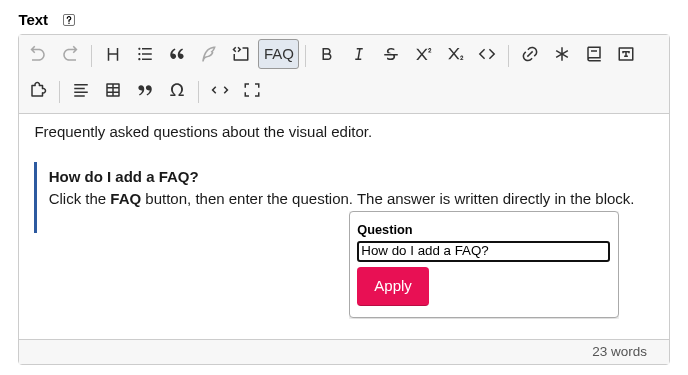
Edit the answer directly in the block; the FAQ button opens the dialog for the question.
In source mode, a block looks like this:
<faq|q=How does the editor work?>
The answer is saved with the article text.
</faq>
1. Declare a SPIP plugin that depends on the editor
paquet.xml
declares <necessite nom="tiptap_spip" />. It also registers the pipelines that add the script,
button, labels, and styles. A final pipeline, pre_echappe_html_propre, turns the shortcut into
HTML for the public site.
For your own plugin, choose a new prefix, rename the folder and PHP functions accordingly, and
adapt the language strings in lang/.
2. Load the script and add the button
In tiptap_spip_faq_pipelines.php,
three pipelines connect the plugin to the editor:
| Pipeline | What it provides |
|---|---|
tiptap_spip_extensions |
The JavaScript URL to load before editors start |
tiptap_spip_toolbars |
The name faq in the edition toolbar, after the code block |
tiptap_spip_i18n |
Translated labels for the button and dialog |
Labels are translated with _T() in the page's interface language: the plugin ships
lang/tiptap_spip_faq_fr.php and lang/tiptap_spip_faq_en.php. A key added by this pipeline
replaces the editor key of the same name: prefix your keys (faq_…) to avoid overwriting one.
The script is registered with find_in_path('javascript/tiptap_spip_faq.js'). CSS is loaded in
the private area and on the public site through header_prive_css and insert_head_css. The
FAQ plugin does not require rebuilding the main plugin's JavaScript.
3. Read and write the shortcut in Tiptap
javascript/tiptap_spip_faq.js
uses the API exposed by window.tiptapSpip. It creates a Tiptap faqItem node with:
spipTokenizerto recognize<faq|q=…>in SPIP source;parseSpipto convert the question and answer into an editable node;renderSpipto write the shortcut when saving;renderHTMLto display the FAQ in the visual area.
The node is registered with registerExtension(FaqItem, { toolbars: ['edition'] }). The same
script adds the button with registerToolbarComponent('faq', …); it opens ui.Popover to enter
or edit the question. The answer remains directly editable in the block.
Use window.tiptapSpip.core for the Tiptap and ProseMirror classes supplied by the editor.
Loading a second copy of those libraries in your plugin can produce incompatible objects.
4. Provide public rendering in SPIP
The editor's JavaScript does not determine public rendering. The example adds a function to
pre_echappe_html_propre that turns <faq|q=…>…</faq> into an HTML block with the question as
its heading. SPIP's propre() still processes the answer. Because the shortcut resembles a SPIP
model, it must be transformed before SPIP processes models.
The example CSS styles the block in the editor and on the site. For your syntax, provide both sides: visual editing and SPIP rendering.
5. Check the round trip
At minimum, try these steps on a test site:
- Enter a FAQ in the editor, save the article, and check its public rendering.
- Reopen the article, change the question and answer, and save again.
- Switch to Source, check the shortcut, return to visual mode, and save without changes.
- Deactivate the FAQ plugin and check that the source text remains accessible. FAQ rendering, however, depends on the plugin that interprets it.
The repository also contains tests for the example. To adapt more complex syntax, see the extensibility specification (in French).